
How to choose the right interactive panel for schools?
- Enosh Paul U
- Mar 16
- 3 min read

Interactive panels for schools are touch-enabled digital displays that enhance classroom learning through interactive teaching tools, multimedia content, and real-time collaboration. When selecting the right interactive flat panel, schools should consider screen size, software compatibility, durability, and interactive panel price to ensure long-term value and effective digital learning.
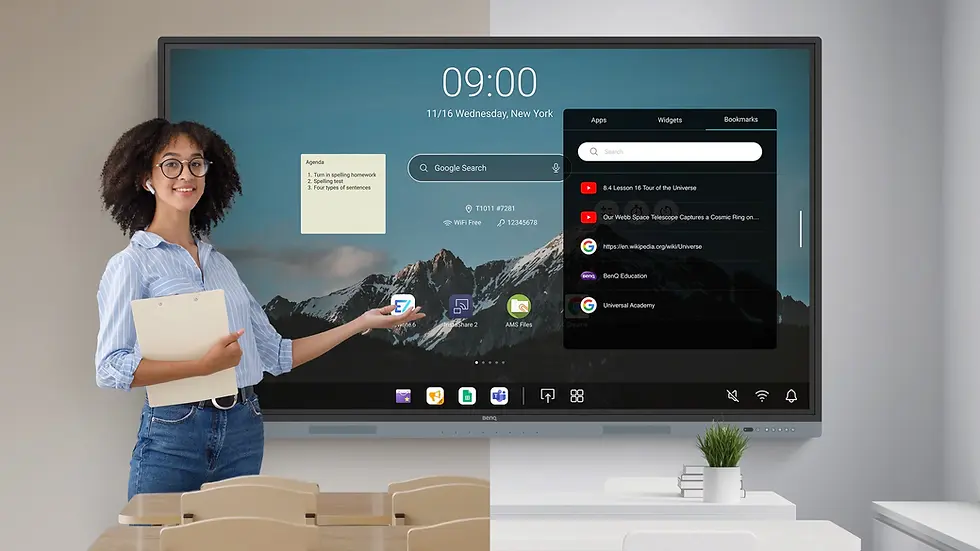
Why Interactive Panels for Schools Are Becoming Essential
Digital learning is transforming modern education, and interactive panels for schools have become one of the most important classroom technologies. These panels replace traditional whiteboards and projectors, allowing teachers to deliver lessons using multimedia, digital annotations, and interactive content.
Compared to traditional smart boards, modern interactive flat panels offer better display quality, faster touch response, and lower maintenance.
Schools that adopt interactive panels benefit from:
Improved student engagement
Better visual learning
Interactive teaching methods
Easier content sharing and collaboration
What Is an Interactive Flat Panel?
An interactive flat panel is a large touchscreen display designed for classrooms, training centers, and meeting rooms. It combines the functions of a computer, projector, and whiteboard into one device.
Teachers can:
Write directly on the screen
Display presentations and videos
Annotate educational content
Share screens from laptops or tablets
Because of these features, interactive flat panels are now widely replacing traditional smart boards in schools.
Key Factors to Consider When Choosing Interactive Panels for Schools
1. Screen Size
Interactive panels usually come in:
65 inch
75 inch
86 inch
Larger classrooms typically require bigger displays to ensure visibility for all students.
2. Touch Technology
Good interactive panels for schools should support multi-touch functionality so multiple students can interact with the display simultaneously.
3. Software and Teaching Tools
Interactive panels should include built-in teaching tools such as:
Digital whiteboard applications
Screen recording features
Cloud integration
Screen sharing options
These tools help teachers deliver engaging lessons.
4. Display Quality
A modern interactive flat panel should support at least 4K resolution for clear visuals and readable content in large classrooms.
5. Durability and Protection
Since interactive panels are used daily in classrooms, schools should choose devices with:
Scratch-resistant glass
Anti-glare screens
Long display lifespan
Interactive Panel Price for Schools
The interactive panel price depends on several factors, including:
Screen size
Display resolution
Built-in operating system
Software features
Installation requirements
Basic models may be suitable for smaller classrooms, while advanced interactive flat panels with collaboration tools cost more but offer better long-term performance.
Schools should focus on value and durability rather than only price when choosing an interactive panel.
Smart Board vs Interactive Flat Panel for Schools
Feature | Smart Board | Interactive Flat Panel |
Display Technology | Projector-based | LED display |
Maintenance | Higher | Low |
Image Quality | Depends on projector | 4K Ultra HD |
Lifespan | Shorter | Longer |
Because of these advantages, many schools are replacing traditional smart boards with interactive flat panels.
Benefits of Interactive Panels for Schools
Schools adopting interactive panels for classrooms experience several benefits:
Higher student participation
Better understanding through visuals
Easier lesson planning
Digital collaboration between students and teachers
Reduced need for printed materials
Interactive panels help create a modern smart classroom environment.
FAQs About Interactive Panels for Schools
What are interactive panels for schools?
Interactive panels for schools are touchscreen displays used for digital teaching, presentations, and interactive learning in classrooms.
What is the difference between a smart board and an interactive flat panel?
A smart board typically uses projector technology, while an interactive flat panel is a modern LED touchscreen display with better image quality and performance.
What is the average interactive panel price?
Interactive panel price varies depending on size, features, and brand. Larger panels with advanced software tools generally cost more.
Are interactive panels better than projectors for classrooms?
Yes, interactive panels offer better image quality, require less maintenance, and provide direct touch interaction compared to projectors.
Final Conclusion
Choosing the right interactive panels for schools is essential for building modern digital classrooms that encourage engagement and collaboration. By selecting high-quality interactive flat panels with the right screen size, teaching tools, and durability, schools can significantly improve the learning experience for both teachers and students.
While interactive panel price may vary depending on features and specifications, investing in the right technology ensures long-term value and effective classroom teaching.
For schools planning to implement smart classroom technology, Nissi Office Systems provides professional consultation, installation, and support for interactive panels and smart boards, helping educational institutions create future-ready learning environments.


Comments